Is It Safe to Use Public Wi-Fi at Starbucks for Payments in 2026?
Is it safe to use public wifi at Starbucks for payments? Mostly yes for casual browsing — but think twice before entering a card number or logging into banking. See the real risks and how to pay safely.

This guide breaks down exactly what’s changed, what’s still dangerous, and how to protect yourself the next time you’re tempted to check out on Starbucks Wi-Fi.
A quick reality check: research on public Wi-Fi usage suggests close to 60% of internet users worldwide routinely check email or social accounts over public networks — payments and banking logins ride along on that same normalized, risky habit. Understanding exactly where the real danger sits (and where it doesn’t) is what actually protects your money, not blanket fear of “public Wi-Fi” as a concept.
If you’re going to use public Wi-Fi at Starbucks for anything payment-related, a few habits make a real difference. Always confirm you’re connecting to the official Starbucks Wi-Fi network and not a lookalike hotspot set up by someone nearby — this is one of the most common tricks used to intercept public Wi-Fi at Starbucks traffic.
Using public Wi-Fi at Starbucks feels harmless for checking email or browsing social media, but the moment you enter payment details, the risks change. Public Wi-Fi at Starbucks, like any open network, isn’t encrypted by default, which means anyone with basic tools on the same network could potentially intercept your data. According to the Federal Trade Commission, public Wi-Fi networks are inherently more vulnerable to snooping than your home connection.
Is It Safe to Use Public Wifi at Starbucks for Payments Today?
The honest, current answer is: it’s safer than it was five years ago, but not risk-free. Widespread HTTPS adoption means over 95% of web traffic is now encrypted by default, so the old scenario of “someone with a laptop reads your card number in plain text” is much harder to pull off than it used to be. Modern browsers also enforce HSTS (HTTP Strict Transport Security), which prevents major banking and shopping sites from silently downgrading to an unencrypted connection.
That said, security researchers who’ve specifically tested coffee-shop and public networks in 2026 still flag two real, current threats:
- Evil twin (rogue access point) attacks. An attacker sets up a fake network with a name like “Starbucks WiFi” or “Starbucks-Guest” right next to the real one. If you connect to the fake one, all your traffic — including anything you type before your browser’s encryption kicks in — passes through the attacker’s device first.
- Auto-reconnect exploits. If your phone or laptop is set to automatically rejoin networks it has used before, an attacker can broadcast a matching network name and get your device to connect without you noticing, especially on a return visit to the same Starbucks.
Neither of these requires the attacker to “break” your bank’s encryption. They just need you to connect to the wrong network in the first place.
What Actually Happens When You Pay Over Public Wi-Fi
To understand the real risk, it helps to know what a hacker on the same network can and can’t see:
- They generally can’t see: your actual card number, password, or account balance on a properly HTTPS-secured banking or checkout page — that data is encrypted end-to-end.
- They potentially can see: which websites and apps you’re connecting to (the domain, not the page content), your IP address, and rough timing/volume of your traffic — enough to know you’re using a banking app, even if not what you’re doing inside it.
- They can trick you into handing over data directly, through a fake Wi-Fi login (captive portal) page, a spoofed checkout screen, or a phishing link sent right after you join the network.
That last point is the real danger. Most people who get compromised on public Wi-Fi at a coffee shop aren’t victims of some advanced decryption attack — they’re tricked into entering their details somewhere they shouldn’t, exactly the kind of scam shown below.
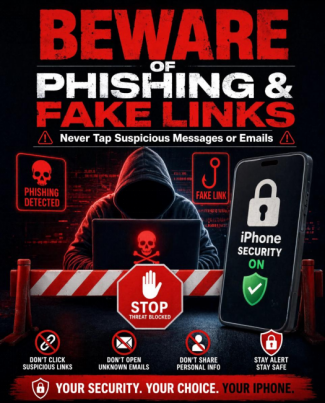
How Hackers Actually Attack Coffee Shop Wi-Fi Users
It helps to know the specific techniques behind these attacks, because each one has a different, targeted defense:
- Packet sniffing. On an open or poorly secured network, specialized software can capture the data packets flowing across the network. Modern HTTPS encryption limits what’s readable inside those packets, but metadata — which sites and apps you’re using — is still often visible.
- Man-in-the-middle (MITM) attacks. An attacker positions themselves between your device and the router, silently relaying your traffic while reading or altering it along the way. This is the classic attack behind fake login pages and injected content.
- Evil twin networks. Instead of attacking the real Starbucks network, the attacker broadcasts their own hotspot with a nearly identical name. Anyone who connects to it hands all their traffic straight to the attacker, bypassing the venue’s actual security entirely.
- Deauthentication attacks. Some attackers send signals that forcibly disconnect nearby devices from the legitimate network, hoping frustrated users will reconnect to a nearby evil twin instead.
- Session hijacking. If an attacker captures an active session token (rather than your password), they can potentially impersonate your logged-in session on a site or app without ever needing your credentials.
None of these require breaking modern encryption — they all rely on getting between you and the network, or getting you to connect to the wrong network voluntarily.
Safe vs. Risky Actions on Starbucks Wi-Fi
| Activity | Risk Level | Why |
| Tapping to pay (Apple Pay / Google Pay / contactless) | Low | Uses NFC and tokenized data, not the Wi-Fi network |
| Browsing the menu or checking rewards points | Low | Little sensitive data exposed even in a worst case |
| Paying through the official Starbucks app | Low–Medium | Typically uses certificate pinning and its own encrypted channel |
| Checking a bank balance in a dedicated banking app | Medium | HTTPS-protected, but still exposes app usage patterns |
| Entering a card number on an unfamiliar website | Medium–High | Relies entirely on that one site’s security and your connection |
| Logging into banking or making a transfer via browser | High | Combines sensitive credentials with the least protected access method |
| Connecting to an unverified network with a similar name | High | Classic setup for an evil twin attack |
Signs You Might Be on a Fake Starbucks Network
Evil twin networks are designed to look convincing, but a few warning signs can give them away:
- Multiple similarly named networks showing up at once, like “Starbucks WiFi,” “Starbucks_Free_WiFi,” and “Starbucks Guest” all appearing in your Wi-Fi list simultaneously.
- No password required at all when the venue’s official network normally asks you to accept terms or log in through a captive portal first.
- Unusually strong or unusually weak signal compared to what you’d expect from the venue’s own access point in that spot.
- Certificate warnings or browser security alerts appearing shortly after connecting, especially when visiting sites you normally trust.
- Unexpected login prompts asking you to “re-verify” an account right after joining the network — a common phishing follow-up after an evil twin connection.
If you notice any of these, disconnect immediately and ask a staff member for the correct network name before reconnecting.
When Paying at Starbucks on Wi-Fi Is Lower Risk
Some payment activity carries relatively low risk even on public Wi-Fi:
- Tapping to pay with Apple Pay, Google Pay, or a contactless card at the register doesn’t route your card number over the Wi-Fi network at all — it uses NFC and a tokenized payment, not the internet connection.
- Using the official Starbucks app to pay from a stored balance is generally safer than typing a card number into a browser, since the app typically uses certificate pinning and its own encrypted channel rather than relying purely on the open network.
- Browsing the menu, checking your rewards points, or reading email on public Wi-Fi carries minimal risk — there’s little sensitive data exposed even in a worst-case scenario.
Is Starbucks Wi-Fi Safe for Online Banking?
Logging into your bank account over Starbucks Wi-Fi is where caution really matters. Unlike casual browsing, banking logins involve sensitive credentials that attackers specifically target on public networks. The Cybersecurity and Infrastructure Security Agency (CISA) recommends avoiding financial transactions on any unsecured public network unless you’re using a VPN or your carrier’s cellular data instead.
When You Should Avoid Paying Over Starbucks Wi-Fi
Be more cautious, or skip it entirely, when:
- Manually entering a card number into a website checkout, especially on a smaller or less-known retailer’s site.
- Logging into a banking app to transfer money, pay a bill, or check an account for the first time on that network.
- Connecting to a network you haven’t verified, especially if there are multiple similarly named options like “Starbucks WiFi” and “Starbucks_Free_WiFi” showing up at once — that’s a classic sign of an evil twin network nearby.
- Any site that shows a certificate warning or doesn’t display “https://” in the address bar. Leave immediately; don’t proceed past the warning.
How to Pay Safely at Starbucks on Public Wi-Fi
If you do need to make a payment while connected to Starbucks Wi-Fi, these habits meaningfully cut your risk:
- Verify the network name with a barista or official signage before connecting, rather than trusting whatever shows up first in your Wi-Fi list.
- Use a VPN for anything financial. A VPN encrypts your traffic before it even reaches the local network, which neutralizes most of the risk from a compromised or fake hotspot.
- Prefer tap-to-pay or the official app over typing a card number into a browser. Tokenized payments simply expose less data than a manually entered card.
- Turn off Wi-Fi and switch to mobile data for banking specifically. It takes a few seconds and removes the public-network risk entirely for that one task.
- Turn off auto-connect to open networks in your phone’s Wi-Fi settings so you’re never silently rejoining a spoofed network from a previous visit.
- Enable multi-factor authentication on your banking and payment apps, so a stolen password alone isn’t enough to access your account.
- Watch for certificate warnings and unexpected login prompts. A sudden request to “re-enter your password” right after connecting to Wi-Fi is a common phishing pattern.
What to Do If You Think Your Payment Info Was Compromised
If you paid over Starbucks Wi-Fi and now suspect something went wrong — an unfamiliar charge, an unexpected password reset email, or a login alert you didn’t trigger — act quickly:
- Contact your bank or card issuer immediately to flag the transaction and, if needed, freeze or reissue the card.
- Change the password for any account you accessed on that network, starting with email and banking.
- Enable or verify multi-factor authentication on those accounts so a leaked password alone isn’t enough for further access.
- Check your bank and card statements closely for the next few weeks, since fraudulent charges sometimes start small to test whether a card is still active.
- Report the incident to your bank’s fraud department and, for identity theft concerns, to the FTC at IdentityTheft.gov.
Is It Safer to Use Data Instead of Starbucks Wi-Fi?
For anything involving money, yes. Switching to your phone’s cellular data (or using it as a personal hotspot for your laptop) keeps your traffic on a connection only you control, removing the shared-network risk entirely. It’s the single easiest fix if you’re ever unsure whether a specific Starbucks network is legitimate.
For general reading on protecting yourself on shared networks, the FTC’s guide on securing personal information, NIST’s cybersecurity basics, CISA’s guidance on public Wi-Fi safety are all useful outside reading alongside this guide.
Frequently Asked Questions
Is it safe to use public wifi at Starbucks for payments if the network is password-protected?
A password reduces some risk by keeping random strangers off the network, but everyone at that Starbucks still shares the same password and network. It’s better than a fully open network, but it doesn’t eliminate the risk for financial transactions.
Can someone steal my card number if I pay on Starbucks Wi-Fi?
It’s unlikely on a properly HTTPS-secured checkout page, since that data is encrypted in transit. The bigger risk is connecting to a fake “evil twin” network or falling for a phishing page, not the encryption itself being broken.
Is tapping my card or phone to pay safer than entering my card number?
Yes. Contactless payments use NFC and tokenized transaction data rather than sending your actual card number over the internet connection, which meaningfully reduces exposure compared to typing your card into a browser.
Do I need a VPN just to check my Starbucks Rewards balance?
No — that’s low-risk browsing. Save the VPN and extra caution for anything involving logins, card numbers, or bank transfers.
What’s the single best habit for paying safely at Starbucks?
Switch to mobile data for anything financial. It’s the fastest way to remove public Wi-Fi from the equation entirely.
Is Starbucks Wi-Fi more dangerous than other coffee shop networks?
Not inherently — the risk comes from the shared, open nature of public Wi-Fi in general, not something specific to Starbucks. The same guidance applies to any café, airport, or hotel network.
Can a VPN fully protect me from all Wi-Fi risks at Starbucks?
A VPN encrypts your traffic and neutralizes most network-level attacks, including evil twins and packet sniffing, but it can’t stop you from voluntarily entering details into a phishing page. Combine a VPN with the habits above for full coverage.
How do I know if I’m connected to the real Starbucks Wi-Fi network?
Ask a barista to confirm the exact network name, and be suspicious of multiple similar-looking options. Official networks typically route you through a captive portal or terms-of-service page before granting full access.
Is it safe to use public Wi-Fi at Starbucks for online shopping?
It depends on the app and connection. Public Wi-Fi at Starbucks is generally fine for browsing, but shopping with saved card details is safer when done through a secured app or with a VPN active.
Should I avoid public Wi-Fi at Starbucks entirely for payments?
Not necessarily — using public Wi-Fi at Starbucks with a VPN or your phone’s mobile data as a backup significantly reduces risk.
Warning Signs of a Compromised Network
- Multiple networks with nearly identical names.
- Certificate warnings on familiar websites.
- Pop-ups demanding identity verification or software downloads to “access” Wi-Fi.
- Unusually slow performance that may indicate traffic redirection.
Quick Pre-Payment Checklist
- Is my VPN connected and active?
- Did I confirm the exact network name with staff?
- Does the site show a valid padlock and HTTPS?
- Is my device software up to date?
- Would I be comfortable if someone could see my screen right now?
So is it safe to use public Wi-Fi at Starbucks for payments? For quick, low-stakes purchases through a secured app (like Starbucks’ own mobile order system), the risk is low. But for banking or entering card details directly into a browser, it’s safer to switch to cellular data or a trusted VPN. A quick comparison from NordVPN’s guide on public Wi-Fi risks breaks down exactly which activities are riskiest.
Final Thoughts
Public Wi-Fi at places like Starbucks is not inherently catastrophic, but it does carry real risks that convenience often masks. A reliable VPN, careful network selection, and basic habits such as multi-factor authentication turn a risky situation into a manageable one. Taking thirty seconds to activate a VPN before entering payment details closes a surprisingly large security gap.casual purchases through trusted apps are low-risk, but banking or entering raw card numbers deserves extra caution.